Native Mac photo browser & image viewer
Browse a shoot and keep only the photos you actually want.
Imagario is a native Mac photo browser and image viewer built for culling — reviewing a shoot, rating frames, applying light adjustments, and selecting keepers. Open any folder with no import and no catalog.

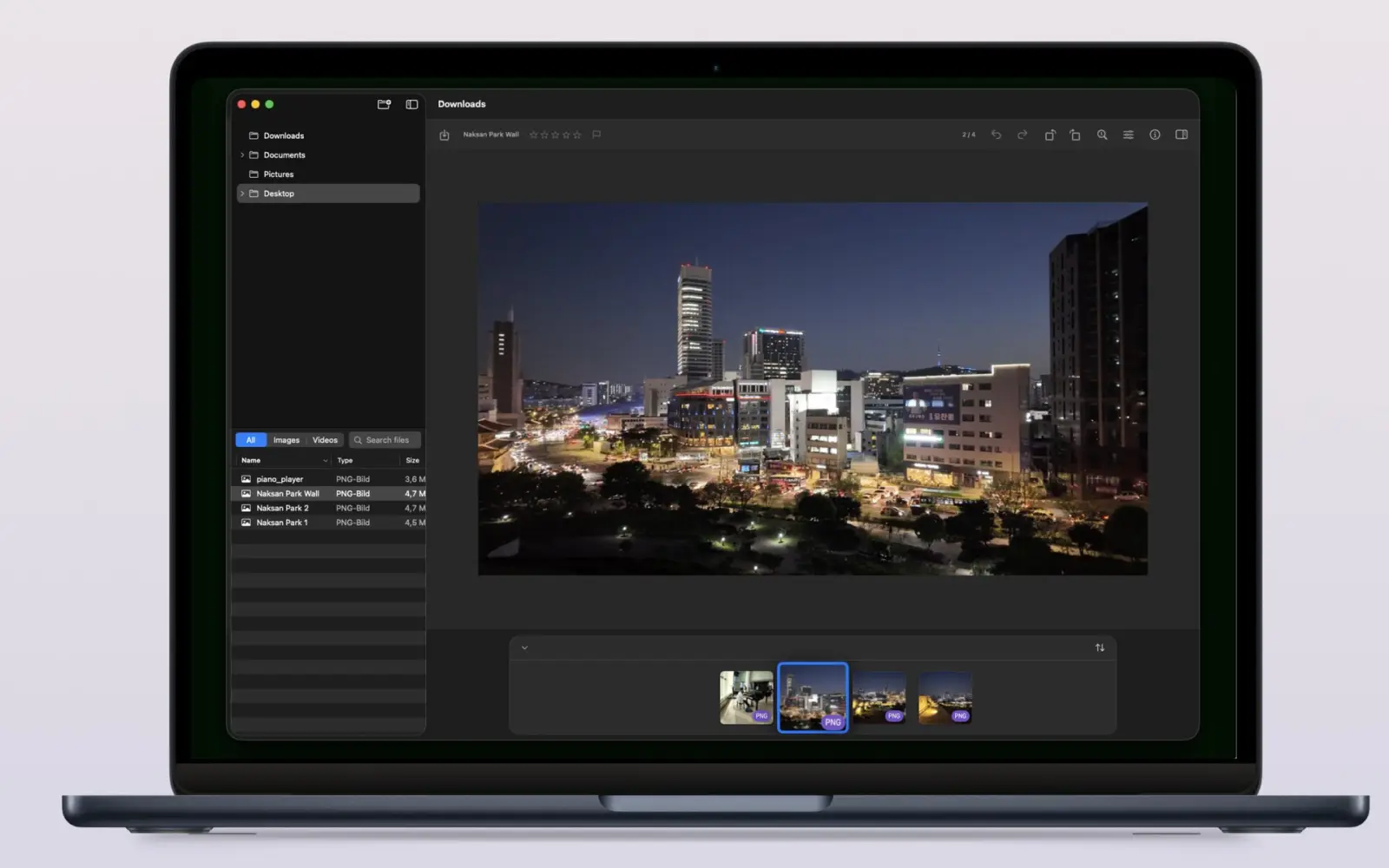

Imagario at a glance
Imagario is a native macOS photo browser, image viewer, and culling tool. It opens any folder directly — no catalog, no import — features star ratings, Pick/Reject flags, light non-destructive adjustments, full EXIF/GPS metadata, and WCAG accessibility compliance.
Catalog-free culling
Star ratings (0–5), Pick/Reject flags (P/X), and fast folder browsing.
Light adjustments & metadata
Tone adjustments, rotation, EXIF inspector, and GPS map preview.
WCAG Accessible & Private
Meets WCAG 2.1 AA guidelines (v1.2.0); sandboxed with no telemetry or cloud.
How do you cull a shoot on a Mac?
Open the shoot folder in Imagario, rate frames 0–5 with number keys, mark Picks (P) or Rejects (X), apply light exposure/contrast tweaks, and drag keepers into the collection — your original files never change.
- 1 Open any folder and keep its full structure within reach in the sidebar tree.
- 2 Rate photos 0–5 or mark Picks (P) and Rejects (X) with one-key shortcuts.
- 3 Zoom and pan with native Mac gestures to inspect every detail.
- 4 Crop, apply light tone adjustments, or strip metadata, saving changes as safe duplicates.
Built for the way Mac users work
Imagario combines a folder-based image viewer, star ratings, Pick/Reject flags, light non-destructive adjustments, and a full EXIF/GPS metadata inspector.
- Lazy folder tree The sidebar loads large libraries on demand — open only the branches you need.
- Star ratings & Pick/Reject flags Rate photos 0–5 with number keys, mark Picks (P) or Rejects (X), and clear ratings (U) to cull shoots at lightning speed.
- Native Mac gestures Pinch to zoom, two-finger pan, Command-scroll and arrow-key navigation feel exactly like native Mac apps.
- Light non-destructive adjustments Adjust exposure, brightness, contrast, highlights, shadows, vibrance, warmth, saturation, sharpness, and rotation with non-destructive duplicates.
- Full metadata inspector File, image, capture, camera, lens, exposure, authoring, location and advanced fields — all in one reorderable panel.
- Metadata removal & EXIF stripping Strip sensitive EXIF, IPTC, or location metadata sections from photos before sharing.
- Crop, drag & drop, and Finder access Crop with drag handles, keyboard shortcuts, or context menus. Drop folders and images into the window, and reveal any file in Finder.
- RAW formats & Video support PRO Free tier handles JPEG, HEIC, PNG, GIF, and TIFF. Imagario Pro unlocks RAW formats (CR3, NEF, ARW, RAF, ORF, RW2, DNG, JXL, AVIF), Video (MP4, MOV), HDR viewing, and frame export.
Imagario Pro
Unlock professional RAW format support, HDR viewing, and video tools with a single purchase.
- Professional RAW Formats CR3, NEF, ARW, RAF, ORF, RW2, DNG, JXL, and AVIF support.
- Video Playback & Preview Native MP4 and MOV playback directly in your shoot browser.
- HDR Display High Dynamic Range viewing on supported Mac displays.
- Video Frame Export Extract high-res PNG still frames from video.
- Advanced EXIF & GPS Inspector Inspect full EXIF, IPTC, and geotag location metadata.
Build a collection without risking the source
Curation in Imagario is non-destructive: selected photos are gathered as copies in a separate collection, so your original folders are never moved, renamed, or modified. Discovery and curation stay separate.
- Rate photos 0–5 or flag Picks (P) / Rejects (X).
- Drag thumbnails into the collection drop zone as they catch your eye.
- Apply light tone adjustments, saving non-destructive duplicates.
- Delete collection copies to the Trash without touching the source folder.
Who Imagario is for
- Photographers Cull shoots fast with rating shortcuts, Pick/Reject flags, and light tone adjustments.
- Travelers Revisit location memories with inline GPS map previews built in.
- Archivists Inspect full metadata and strip sensitive EXIF fields before publishing.
Screenshots
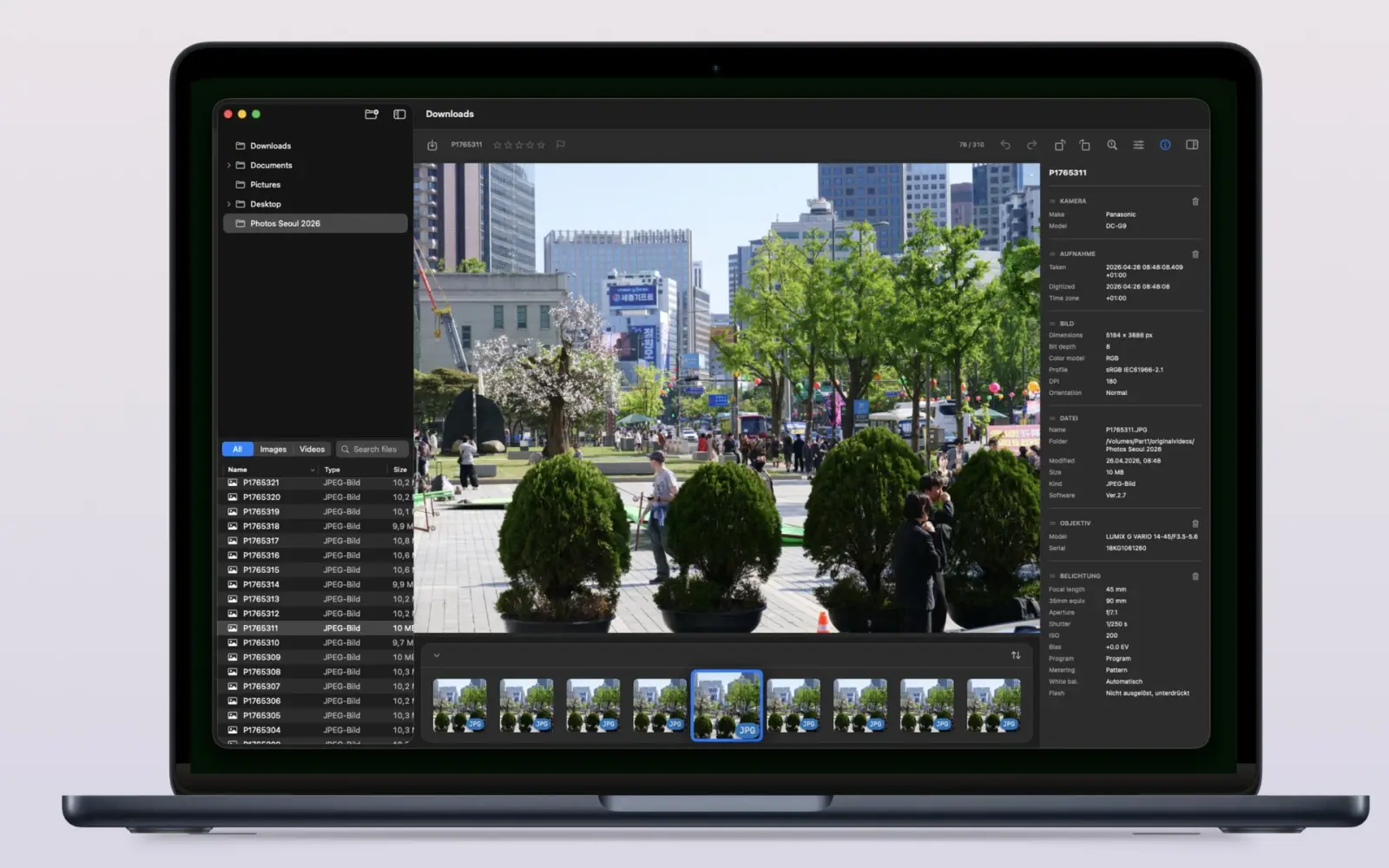
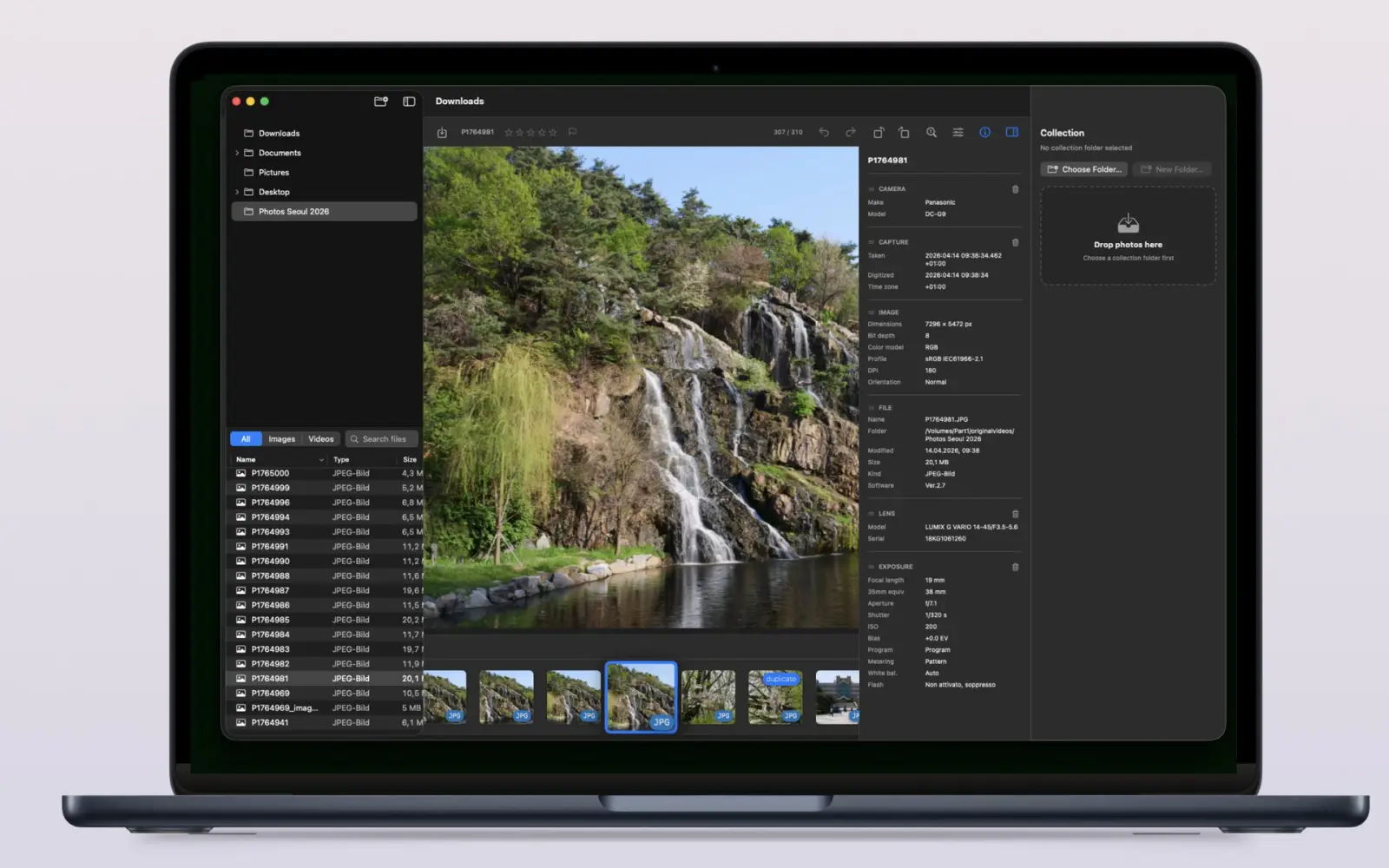
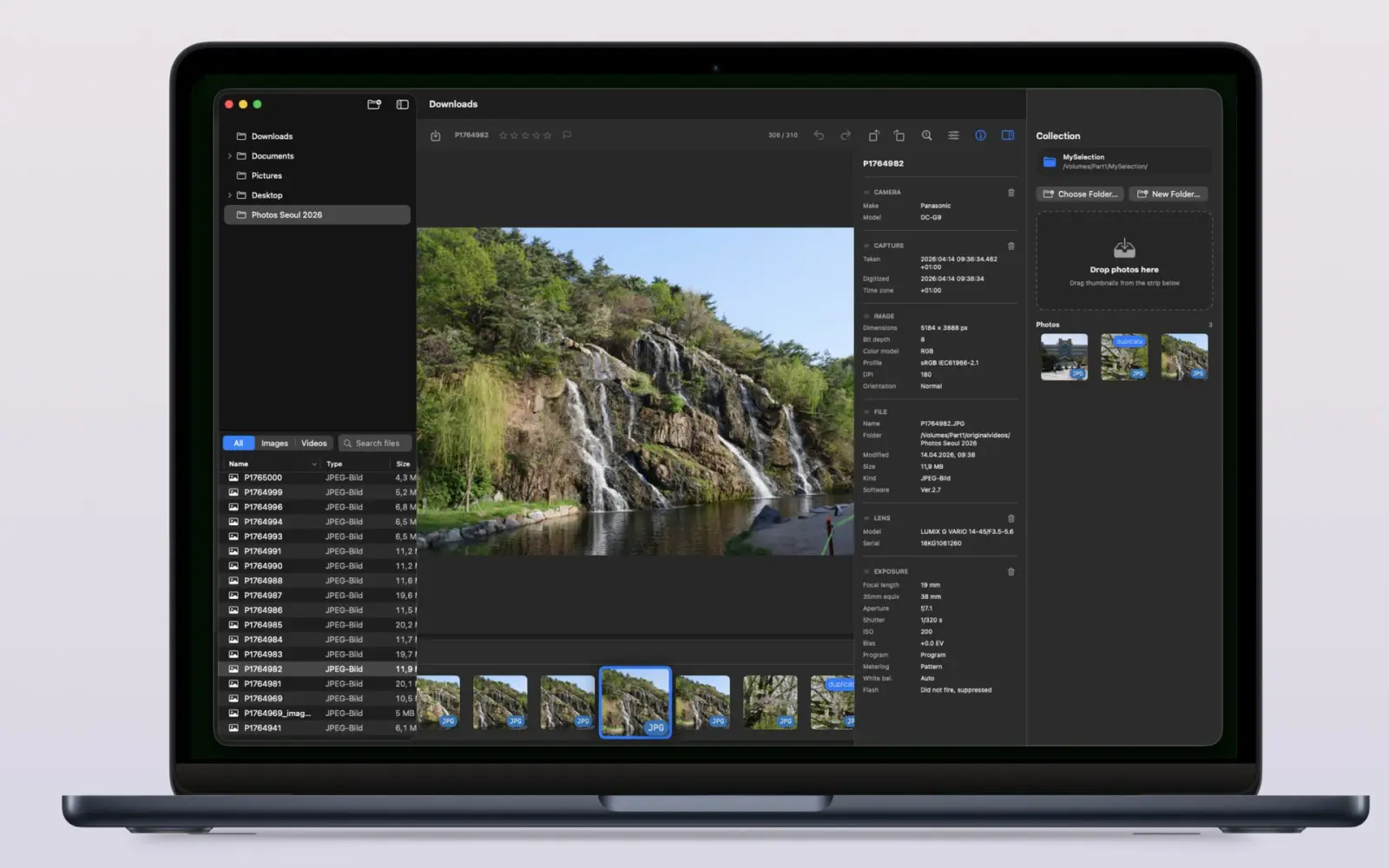
Private & Accessible by design
- Sandboxed — you choose which folders to open
- Security-scoped bookmarks remember your source and collection folders
- No accounts, no telemetry, no cloud
Designed with accessibility guidelines in mind.
Frequently asked questions
What is Imagario?
Imagario is a native Mac photo browser, image viewer, and culling tool. Open any folder to browse a shoot quickly, rate frames (0-5), mark Picks/Rejects, apply light tone adjustments, inspect EXIF/GPS metadata, and collect keepers.
What does photo culling mean?
Photo culling is reviewing a shoot and selecting the best frames. Imagario speeds this up with 0–5 rating shortcuts, Pick (P) and Reject (X) flags, fast thumbnail strip windowing, and a non-destructive keeper collection.
Does Imagario modify my original photos?
No. Curation is non-destructive: original folders stay intact while selected images or light adjustments come together as copies in a separate collection (`_imagario`).
Do I need to import my photos into a catalog?
No. Imagario opens folders directly — the sidebar tree loads large libraries on demand, so there is no import step and no catalog to maintain.
Can Imagario edit my photos?
Imagario focuses on culling, but includes light non-destructive tone adjustments (exposure, brightness, contrast, highlights, shadows, vibrance, warmth, saturation, sharpness), rotation, and EXIF metadata removal. Edits save to duplicate copies, leaving originals untouched.
Is Imagario private?
Yes. Imagario is sandboxed, so it can only see the folders you explicitly open. It uses no accounts, no telemetry, no cloud services, and your photos are never used for AI training.
Questions or feedback?
If you want to request features, report issues or tell us what would make Imagario more useful for your workflow, send a message anytime.
- Email support development@thelittlebakery.org
- Typical response time within 2 business days
Changelog
Release notes for Imagario on macOS.
-
v1.2.0 macOS
- Crop photos with drag handles, keyboard shortcuts, and right-click menus.
- Drag folders and images directly into the window; open files in Finder from the context menu.
- Read in-app user documentation in every supported language.
- Get instant image-adjustment response, smarter double-click zoom, and improved metadata sorting.
- The View Actual Size button now centers images as expected.
-
v1.1.1 macOS
- Small bug fixes and code improvements.