原生 Mac 照片浏览器与图片查看器
浏览一次拍摄,只保留你真正想要的照片。
Imagario 是一款为精选而生的原生 Mac 照片浏览器与图片查看器——浏览一次拍摄、为照片评分、进行轻量调整并挑选精选照片。打开任意文件夹,无需导入,也无需建立图库。

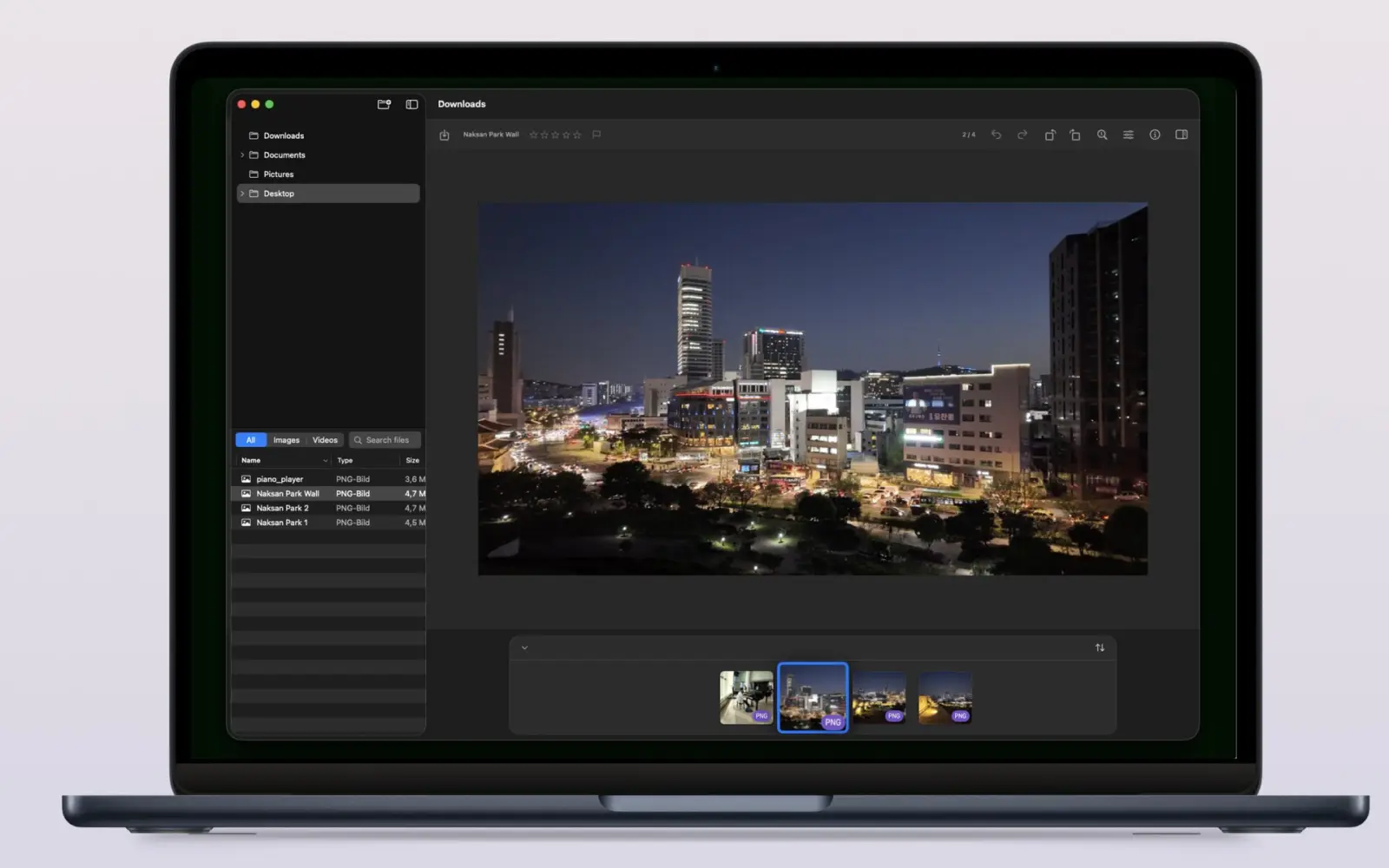

Imagario 一览
Imagario 是一款原生 macOS 照片浏览器、图片查看器与精选工具。它可直接打开任意文件夹——无需图库,无需导入——提供星级评分、精选/剔除标记、轻量非破坏性调整、完整的 EXIF/GPS 元数据以及 WCAG 无障碍合规。
无需图库的精选
星级评分(0-5)、精选/剔除标记(P/X)与快速文件夹浏览。
轻量调整与元数据
色调调整、旋转、EXIF 检查器与 GPS 地图预览。
符合 WCAG 且注重隐私
符合 WCAG 2.1 AA 准则(v1.2.0);沙盒运行,无遥测,无云端。
如何在 Mac 上精选一次拍摄的照片?
在 Imagario 中打开拍摄文件夹,用数字键为照片评 0-5 分,标记精选(P)或剔除(X),轻微调整曝光和对比度,然后将精选照片拖入收藏——你的原始文件永远不会改变。
- 1 打开任意文件夹,其完整结构会一直显示在侧边栏树状目录中,触手可及。
- 2 为照片评 0-5 分,或用单键快捷方式标记精选(P)和剔除(X)。
- 3 用 Mac 原生手势缩放和平移,查看每一处细节。
- 4 裁剪、轻度调整色调或移除元数据,并将更改保存为安全副本。
为 Mac 用户的工作方式而打造
Imagario 集成了基于文件夹的图片查看器、星级评分、精选/剔除标记、轻量的非破坏性调整、完整的 EXIF/GPS 元数据检查器,以及 WCAG 无障碍合规。
- 按需加载的文件夹树 侧边栏仅在需要时加载大型图库——只展开你需要的分支。
- 星级评分与精选/剔除标记 用数字键为照片评 0-5 分,用精选(P)或剔除(X)标记,用(U)清除评分,闪电般完成精选。
- Mac 原生手势 双指捏合缩放、双指平移、Command 滚动与方向键导航,体验与原生 Mac 应用完全一致。
- 轻量非破坏性调整 通过非破坏性副本调整曝光、亮度、对比度、高光、阴影、鲜艳度、色温、饱和度、锐度与旋转。
- 完整元数据检查器 文件、图像、拍摄、相机、镜头、曝光、创作者、位置及高级字段——全部集中在一个可重新排序的面板中。
- 元数据与 EXIF 去除 分享照片前,去除敏感的 EXIF、IPTC 或位置元数据部分。
- RAW 格式与视频(Pro) 免费版支持 JPEG、HEIC、PNG、GIF 和 TIFF。Imagario Pro 解锁 RAW 格式(CR3、NEF、ARW、RAF、ORF、RW2、DNG、JXL、AVIF)、视频(MP4、MOV)、HDR 查看、视频截帧导出以及 EXIF 元数据编辑。
Imagario Pro
一次购买即可解锁专业级 RAW 支持、HDR 查看、视频工具与 EXIF 元数据编辑。
- 专业级 RAW 格式 支持 CR3、NEF、ARW、RAF、ORF、RW2、DNG、JXL 和 AVIF。
- 视频播放与预览 在拍摄浏览器中直接原生播放 MP4 和 MOV。
- HDR 显示 在支持的 Mac 屏幕上以高动态范围查看。
- 视频截帧导出 从视频中提取高分辨率 PNG 静态帧。
- EXIF 与元数据编辑 编辑 EXIF、IPTC 与地理位置元数据。
在不冒险改动原始文件的前提下建立收藏
Imagario 中的精选是非破坏性的:选中的照片会以副本形式汇集到单独的收藏中,因此你的原始文件夹永远不会被移动、重命名或修改。浏览与精选始终是两件独立的事。
- 为照片评 0-5 分,或标记为精选(P)/剔除(X)。
- 看中缩略图时,将其拖入收藏的放置区。
- 进行轻量色调调整,并保存为非破坏性副本。
- 将收藏中的副本移入废纸篓,而不影响源文件夹。
Imagario 适合谁
- 摄影师 借助评分快捷键、精选/剔除标记与轻量色调调整,快速精选每次拍摄。
- 旅行者 通过内置的 GPS 地图预览,重温拍摄地点的回忆。
- 档案管理者 发布前查看完整元数据,并去除敏感的 EXIF 字段。
Screenshots
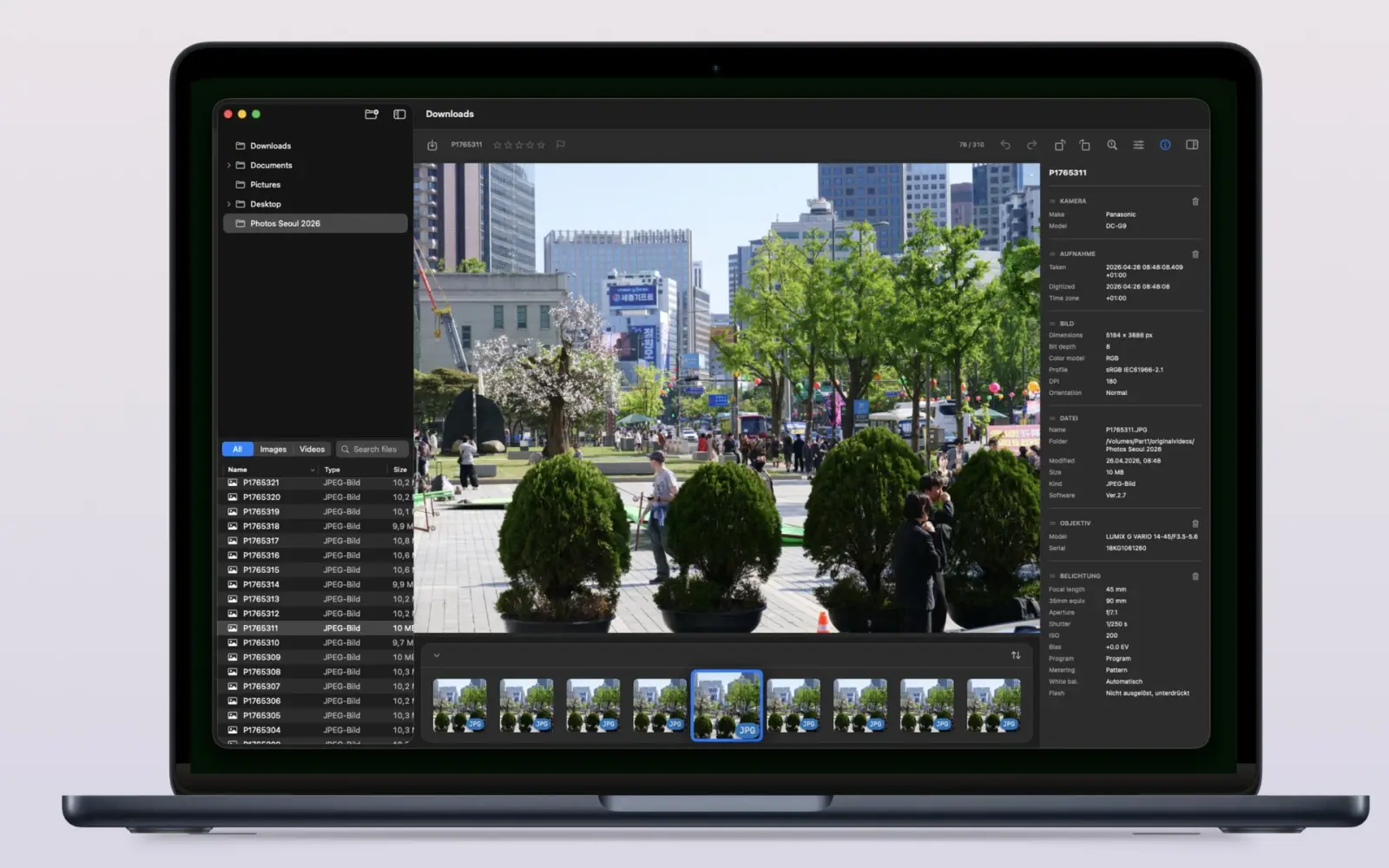
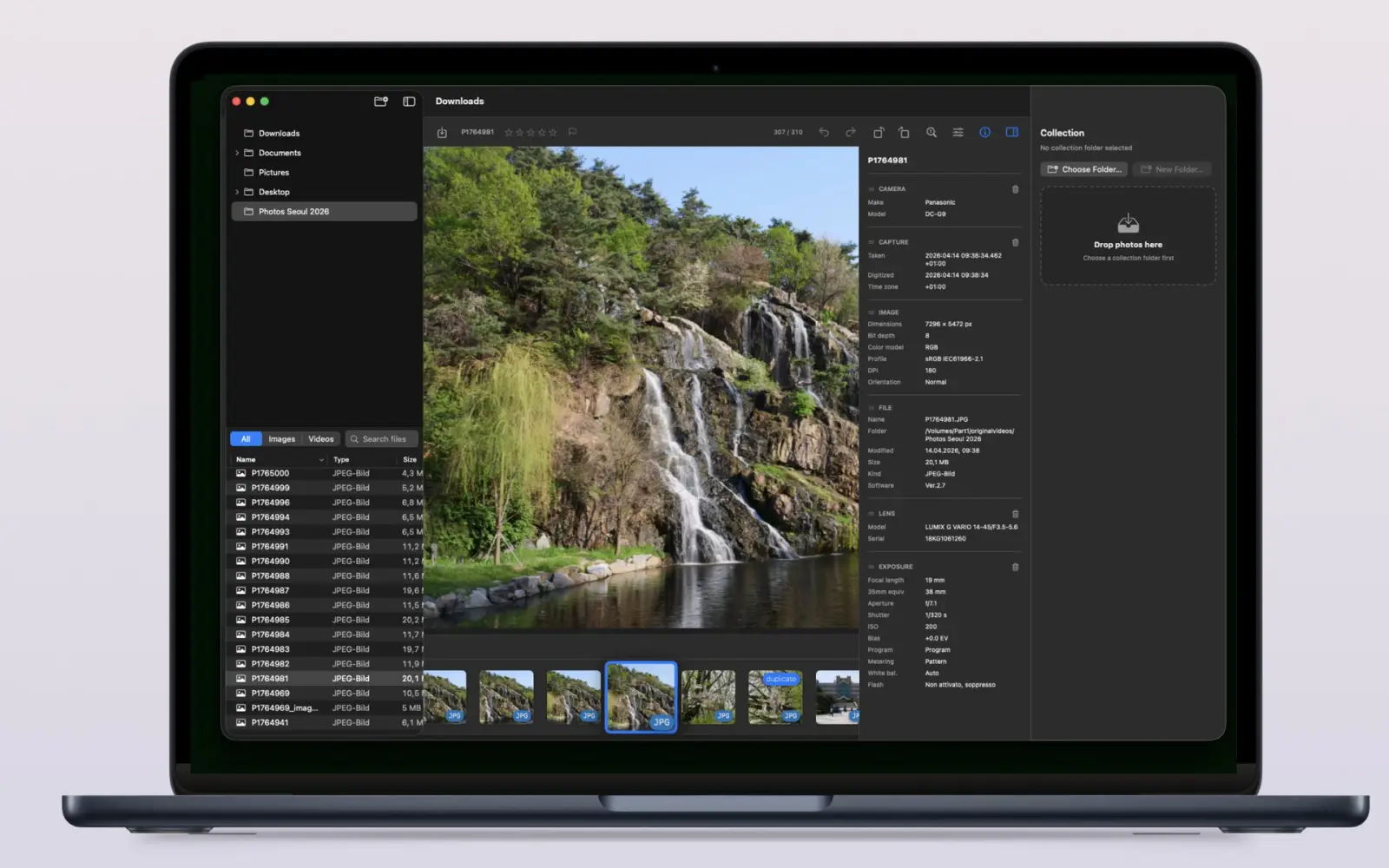
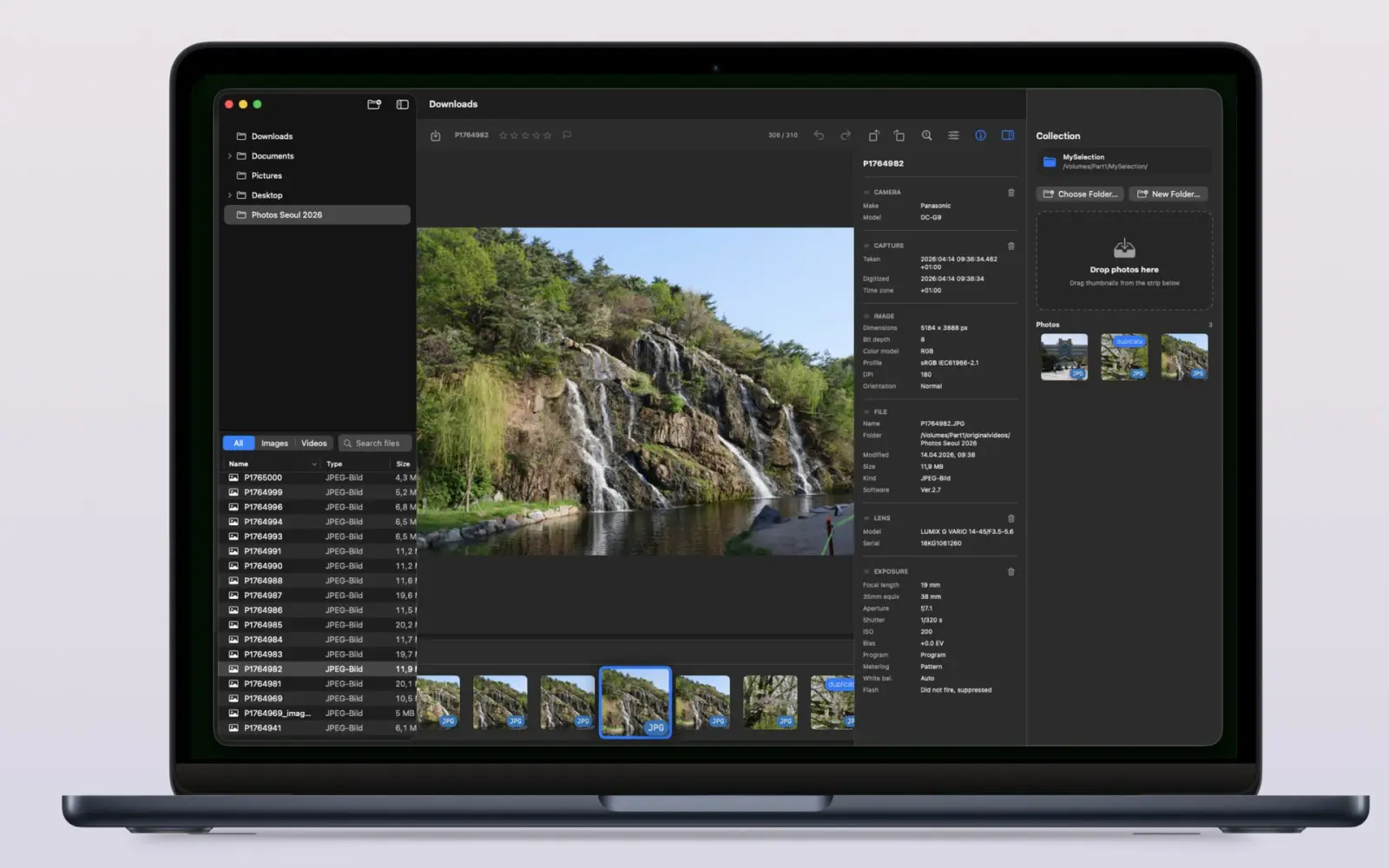
从设计之初就注重隐私与无障碍
- 沙盒运行 — 你自己选择要打开哪些文件夹
- 安全范围书签会记住你的源文件夹和收藏文件夹
- 无账户,无遥测,无云端
设计时参考了无障碍指南。
常见问题
Imagario 是什么?
Imagario 是一款原生 Mac 照片浏览器、图片查看器与精选工具。打开任意文件夹即可快速浏览一次拍摄,为照片评分(0-5)、标记精选/剔除、进行轻量色调调整、查看 EXIF/GPS 元数据,并收集精选照片。
照片精选是什么意思?
照片精选是指浏览一次拍摄并挑选出最好的照片。Imagario 通过 0-5 分评分快捷键、精选(P)与剔除(X)标记、极速的缩略图窗口化加载以及非破坏性的收藏功能来加快这一过程。
Imagario 会修改我的原始照片吗?
不会。精选过程是非破坏性的:原始文件夹保持不变,而选中的图像或轻量调整会以副本形式汇集在单独的收藏(`_imagario`)中。
我需要把照片导入图库吗?
不需要。Imagario 直接打开文件夹——侧边栏树会按需加载大型图库,因此没有导入步骤,也无需维护任何图库。
Imagario 可以编辑我的照片吗?
Imagario 专注于精选,但也包含轻量的非破坏性色调调整(曝光、亮度、对比度、高光、阴影、鲜艳度、色温、饱和度、锐度)、旋转以及 EXIF 元数据去除功能。编辑内容会保存为副本,原始文件始终保持不变。
Imagario 注重隐私吗?
是的。Imagario 在沙盒中运行,只能看到你明确打开的文件夹。它不使用账户、遥测或云服务,你的照片也绝不会被用于训练 AI。
有问题或反馈?
如果你想请求新功能、报告问题,或者告诉我们如何让 Imagario 更好地融入你的工作流程,欢迎随时给我们写信。
- 邮件支持 development@thelittlebakery.org
- 常见响应时间 2 个工作日内
更新日志
Imagario(macOS 版)的版本说明。
-
v1.2.0 macOS
- 裁剪工具支持拖动手柄、键盘快捷键和右键菜单。
- 可将文件夹和图片直接拖入窗口,并从右键菜单在 Finder 中打开文件。
- 所有支持语言均提供应用内用户文档。
- 图像调整即时响应,双击缩放更智能,按元数据排序得到改进。
- “查看实际大小”按钮现在会按预期将图片居中。
-
v1.1.1 macOS
- 少量错误修复与代码改进。